What a spreadsheet handles well
Spreadsheets are at their best when the work is about numbers you look at, not messages you send.
- Pricing. Building a price from labor, product, drive time, overhead and margin is just math. A spreadsheet lets you change one input, like your chemical cost or labor rate, and see every package price update. Most field service apps store prices; very few help you decide what they should be.
- Quoting by measurement. Square feet times a rate, plus multipliers and a minimum, is easy to lay out in rows. You can see the whole quote and adjust it on the spot.
- Job costing and monthly profit. Logging price, hours, product and miles per job, then rolling it into a monthly profit and loss, is something a spreadsheet does cheaply. On several software plans, job costing sits on a higher tier (see below).
- Flexibility. You own the file. Add a column for ceramic coating warranty dates or roof pitch, and it’s there. No feature request needed.
- Cost. A spreadsheet runs in tools many owners already have, and there’s no monthly fee that keeps running through a slow winter.
What a spreadsheet does poorly
A spreadsheet can’t act on its own. It doesn’t text a customer the night before, take a deposit when someone books at 10 p.m., or follow up on an unpaid invoice while you’re on a roof. Everything that involves reaching out to customers on a schedule is manual. It also gets awkward when more than one person needs to see and change the schedule from the field at the same time.
Signals you’ve outgrown the spreadsheet
These are rules of thumb, not industry benchmarks. If three or more describe your last month, it’s time to run the cost comparison below.
| Area | Signal |
|---|---|
| Job volume | You’re booking more jobs a week than you can track in your head, and you’ve double-booked or forgotten a job at least once. |
| Crew | A second person needs to see the schedule, job notes and photos without calling you. |
| Scheduling | Rescheduling for rain or a no-show means a chain of texts and calendar edits that takes most of an evening. |
| Payments | Customers ask for a card link, or you’re chasing invoices that are weeks past due because nobody sent a reminder. |
| Reminders | You get “are you still coming?” calls, or no-shows cost you a drive and a slot more than once a month. |
| Recurring work | You have maintenance washes, storefront routes or HOA contracts that should repeat and bill on a schedule. |
| Admin time | Booking, confirming, invoicing and following up takes several hours a week that you could be working or resting. |
If none of these sound familiar, a spreadsheet is probably still the right tool. Save the money and put it into marketing.
A cost comparison framework
Compare what software costs against what it actually saves or earns. Use your own numbers in four steps.
- Put a price on your admin time. Use the hourly labor rate from your pricing (our mobile detailing pricing guide shows how to set it).
- Estimate hours saved per month. Be conservative. Count only tasks the software would really automate: reminders, booking, invoice follow-ups, rescheduling texts.
- Estimate lost revenue recovered. No-shows prevented by reminders and deposits, and invoices paid faster.
- Subtract the full software cost. The plan you’d really need (not the starting price), extra users, add-ons, and any text-message fees.
Now the same math for a part-time pressure washer doing four jobs a week: maybe 1 hour a week saved (about 4.3 hours a month, $172 at $40/hour) and no real no-show problem. Against a $99 plan, it still pays on paper, but against a $29 plan with fewer features it pays better. And if those saved hours wouldn’t turn into paid work or real rest, the spreadsheet is fine for now.
Another quick test: divide the monthly software cost by your average profit per job. If a plan costs $99 a month and the average job clears $60 after costs (hypothetical), the software needs to win or save about 1.7 jobs a month to break even.
What the main options cost, from vendor pricing pages (checked Oct 2026)
Some links are affiliate links; we may earn a commission at no cost to you. Details
- Jobber: Core $29/mo billed annually or $49/mo with no commitment (1 user); Connect $99/mo annually or $139/mo no commitment, which adds automated client reminders, automated quote and invoice follow-ups and QuickBooks Online sync; Grow $149/mo annually or $199/mo no commitment, which adds job costing and two-way texting. Extra users are $29/mo each. Jobber showed a limited-time annual discount ending October 30, 2026, so the price you see may differ. Free trial: 14 days on Grow, no card required.
- Housecall Pro: Basic $59/mo billed annually, listing online booking, estimates and invoicing, a price book, job costing and review management. Essentials (5 users included) and MAX (8 users included) prices weren’t shown openly when we checked. 14-day free trial on MAX, no card required. No long-term contracts.
- GorillaDesk: priced per route (each technician who runs their own schedule), paid monthly: Basic $49/mo, Pro $99/mo, Growth $149/mo for one route, with unlimited admin and crew users. Automated email and SMS reminders are listed on Basic; online booking on Pro. Texting is a $5/mo SMS subscription plus prepaid credits. Monthly accounts can be frozen for seasonal businesses.
For detail shops and mobile detailers specifically: Urable is built for automotive care, with vehicle records, VIN scanning, photo inspections and unlimited users on every plan. Its pricing page lists Express at $70/mo, Pro at $110/mo and Enterprise at $183/mo (checked Oct 2026); online booking and profit analytics start on Pro. Our team has used Urable day to day on real detail jobs and rates it highly. It’s the first one we’d suggest a detailer trial. Urable has no affiliate program, so we earn nothing from that link. Our full detailing software comparison covers it in more depth, and pressure washers can see Jobber vs Housecall Pro vs GorillaDesk.
The middle path: software for messages, spreadsheet for money
You don’t have to pick one. Many owners use an entry-level plan for booking, reminders and payments, and keep pricing and job costing in a spreadsheet. That keeps the monthly bill on a lower tier while still automating the customer-facing work. It also means your profit numbers don’t depend on which plan you’re on, and they come with you if you ever switch apps.
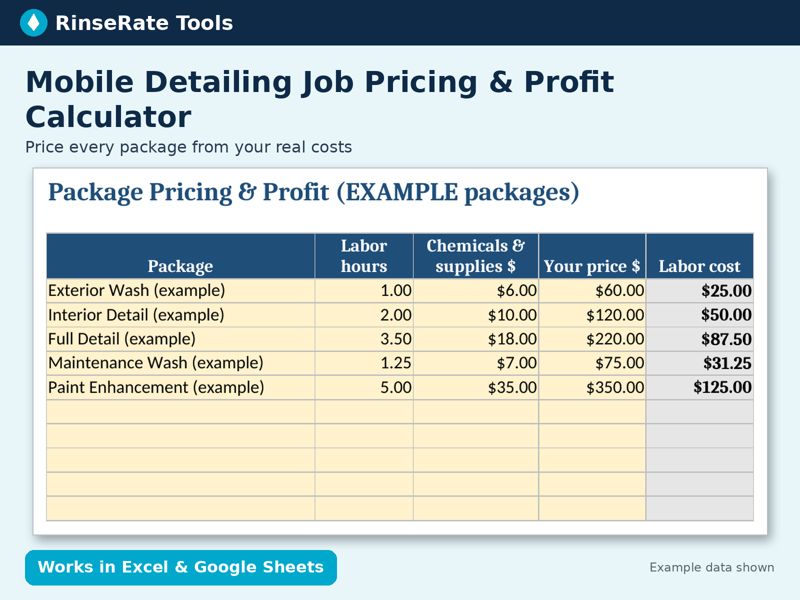
Template: Mobile Detailing Job Pricing & Profit Calculator
Enter your labor rate, chemical cost, travel cost per mile and overhead once. See true cost, profit, margin, profit per hour and a suggested price for each package, plus a one-job quote tab with vehicle-size multipliers and add-ons.
Excel + Google Sheets. Regular price $14; check the listing for current price. Example data is labeled; replace it with your own numbers.
Get the template on Payhip Or on Gumroad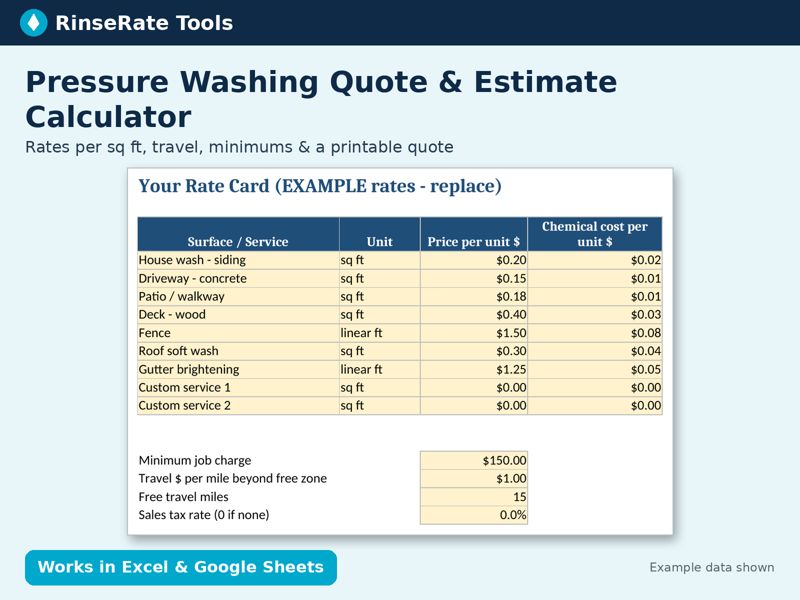
Template: Pressure Washing Quote & Estimate Calculator (Sq Ft)
Set your rate per square foot or linear foot for 9 surfaces, type measurements on site, and get a totaled estimate with travel, minimum-job adjustment, tax and your internal chemical cost. A printable quote tab fills itself.
Excel + Google Sheets. Regular price $15; check the listing for current price. Example data is labeled; replace it with your own numbers.
Get the template on Payhip Or on GumroadHow to migrate without losing customers or data
- Clean your customer list first. One row per customer: name, phone, email, service address, billing address if different, notes (gate codes, dog in yard, vehicle details). Remove duplicates. Save it as a CSV, since most tools import that format.
- Turn your price sheet into a price book. Each package or surface becomes a service or line item with a unit (each, sq ft, linear ft) and rate. If your prices are guesses, fix them now; a price book full of guesses only sends bad quotes faster. See how to quote pressure washing per square foot or how to build a detailing price list.
- Ask about import help. GorillaDesk says it migrates data free for paid accounts (contact details, addresses, notes and a starting balance, but not full past service history). Urable says it can import customer and products/services lists. Ask any vendor exactly what comes across before you commit.
- Use the free trial on real jobs. Book, quote, reschedule, invoice and collect payment on a real week of work. Notice how many taps each step takes in a driveway.
- Run both for two weeks. Keep the spreadsheet as the backup while the new system takes over scheduling and reminders. Move recurring customers last, once you trust the setup.
- Set up the automations you’re paying for. Reminder timing, “on my way” texts, deposit rules, invoice follow-ups. Owners often pay for a tier and never switch these on.
- Check your exit. Before you get comfortable, confirm you can export customers, jobs and invoices.
Quick decision guide
Stay on a spreadsheet if you’re solo, your schedule fits in your head, no-shows are rare and you invoice on the spot.
Go hybrid if reminders and online payments would save you real time but money is tight. Pick an entry plan and keep pricing and job costing in a spreadsheet.
Go all-in on software if you have a crew, recurring routes or more admin than you can handle, and the cost comparison above clearly comes out ahead.
Either way, start with prices you trust. Our free price sheet turns your costs into a suggested price for every service.
Turn your labor, overhead, travel and product costs into a suggested price for every service. Excel + Google Sheets + printable PDF. Pay what you want, $0 minimum.
Get the free price sheet
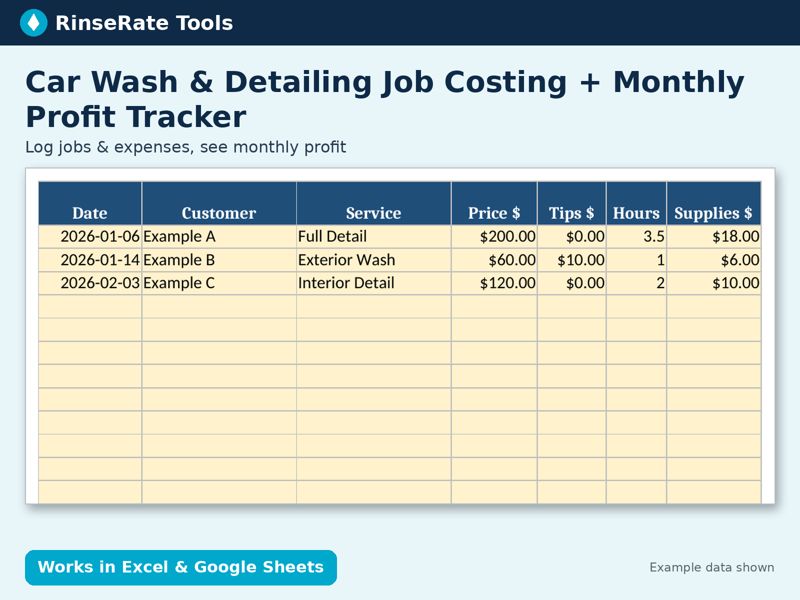
Template: Car Wash & Detailing Job Costing + Monthly Profit Tracker
Log each job (price, tips, hours, supplies, miles) and every expense. The Monthly Summary rolls up revenue, job costs, expenses, net profit and average profit per job for all 12 months.
Excel + Google Sheets. Regular price $17; check the listing for current price. Example data is labeled; replace it with your own numbers.
Get the template on Payhip Or on Gumroad