 RinseRate Tools
Disclosure: Some links on this page are affiliate links. If you buy through them, RinseRate Tools may earn a commission at no extra cost to you. We only recommend tools we’ve researched, and our ranking isn’t paid. Full disclosure.
Best Software for Mobile Detailing Businesses
Most mobile detailers start with a phone, a notes app and a payment app. That works until the week you double-book a ceramic coating, forget to text a customer you’re running late, or realize you can’t say which packages actually make money. Software fixes the first two. The third one, knowing your numbers, is something you have to set up yourself no matter which app you choose.
This guide compares five tools detailers commonly look at. We have not been paid to rank them, and we don’t claim results we can’t show you. What follows is what each vendor publishes, plus the questions an owner-operator should ask before signing up.
What a mobile detailer actually needs from software
Before comparing brands, write down which of these you need now and which you’ll need in a year. Paying for features you won’t use for 12 months is the most common software mistake in small service businesses.
- Online booking with deposits. No-shows hurt more when you’ve already driven 25 minutes. A booking page that can take a deposit pays for itself fast.
- Vehicle-aware quoting. A sedan and a third-row SUV aren’t the same job. Look for package pricing with size options or line items you can add on site.
- “On my way” texts and reminders. Automated reminders cut down on the “are you still coming?” calls.
- Payments in the field. Tap to pay or a card reader, and the ability to collect tips.
- Photos on the job record. Before-and-after photos protect you in a damage dispute.
- Routing. If you do 3 to 5 jobs a day across a metro, drive-time tools matter more than almost anything else.
- Job costing or profit reporting. Many plans only offer this on higher tiers. If you’re solo, a spreadsheet can do it for far less.
Quick comparison
| Tool | Starting price (vendor page) | Built for | Free trial |
|---|---|---|---|
| Jobber | Core: $29/mo billed annually, or $49/mo with no commitment, 1 user (checked Oct 2026) | Home and field service in general | 14 days on the Grow plan, no card (checked Oct 2026) |
| Housecall Pro | Basic: $59/mo billed annually (checked Oct 2026) | Home service trades | 14 days on the MAX plan, no card (checked Oct 2026) |
| Urable | Express: $70/mo or $840/yr, unlimited users (checked Oct 2026) | Automotive care (and lawn care) | Check current offer |
| Mobile Tech RX | Check current pricing | Mobile automotive services | Check current offer |
| Markate | Check current pricing | General service businesses | Check current offer |
Jobber was running a limited-time annual discount ending October 30, 2026 when we checked, so the price you see may differ.
Jobber
Jobber is one of the best-known field service apps, and it shows in how polished the quote-to-invoice flow is. On its pricing page, Core includes online booking, quotes, invoices with online payments, a simple website and built-in reporting. Connect ($99/mo annual for one user, $139/mo no-commitment) adds automated client reminders, automated quote and invoice follow-ups, checklists and QuickBooks Online sync. Job costing and two-way texting are listed on Grow ($149/mo annual for one user). Extra users are $29/mo each. Card processing is listed at 2.9% + 30¢ online and 2.7% + 30¢ for Tap to Pay. (checked Oct 2026)
Good fit: detailers who also sell recurring maintenance washes, fleet accounts or multi-service work and want a mature, widely supported tool.
Watch out for: the features many detailers want most, like automated reminders and job costing, sit above the entry tier. Price the plan you’ll really need, not the starting price.
Housecall Pro
Housecall Pro lists Basic at $59/mo billed annually, with online booking, scheduling and dispatch, estimates and invoicing, payments and consumer financing, a price book, job costing and review management. Essentials adds routes, flat-rate pricing, checklist automations, photo reports, GPS tracking and QuickBooks Online sync, and includes 5 users. MAX includes 8 users ($35/mo per extra user) and adds route optimization, recurring service plans and API access. The page lists card rates as low as 2.59% and says there are no long-term contracts. We couldn’t see Essentials or MAX prices without going through their plan quiz, so check current pricing for those. (checked Oct 2026)
Good fit: detailers who want job costing and review requests on the starting plan.
Watch out for: it’s designed around home trades like HVAC and plumbing, so vehicle-specific details (VINs, vehicle size) aren’t the focus.
Urable
Urable is the most automotive-specific tool here. Its pricing page lists three plans: Express at $70/mo, Pro at $110/mo and Enterprise at $183/mo, all with unlimited users and no contracts. Express includes automated reminders, Stripe and Square integration, text and email invoicing and inventory tracking. Online booking, QuickBooks integration and profit analytics are on Pro. The feature list also covers vehicle data and photo storage, VIN scanning, a CARFAX integration and “On My Way” messages with ETA. (checked Oct 2026)
Good fit: detailers and ceramic or film shops who want vehicle records, and teams where several people need logins, since users are unlimited.
Watch out for: online booking, which most mobile detailers want, starts on the $110 Pro plan.
Mobile Tech RX and Markate
Mobile Tech RX is built for mobile automotive services, and Markate is a general service-business app. We couldn’t confirm current pricing or plan details on their own sites this session, so we’re not summarizing them yet. Check current pricing directly, and ask for a demo built around a detail job, not a plumbing call.
How to choose in one afternoon
- Know your cost per job first. Software won’t tell you whether a $180 interior-and-exterior package makes money. Work out your labor, product, drive and overhead cost per job (our mobile detailing pricing guide walks through it).
- Set a software budget as a share of revenue. If a plan costs $150/mo and your average job clears $60 after costs, that’s 2.5 jobs a month just to pay for the app.
- Run a real week in the trial. Book, quote, reschedule, collect payment and pull a report on real jobs. Pay attention to how many taps it takes in a driveway in the sun.
- Check how easy it is to leave. Ask whether you can export customers, jobs and invoices.
Is a spreadsheet enough?
For a solo detailer doing under about 15 jobs a week, honestly, often yes. A calendar app plus a payment app plus a good pricing spreadsheet covers most of it. Move to software when scheduling, reminders and follow-ups start eating your evenings, or when you add a second person.
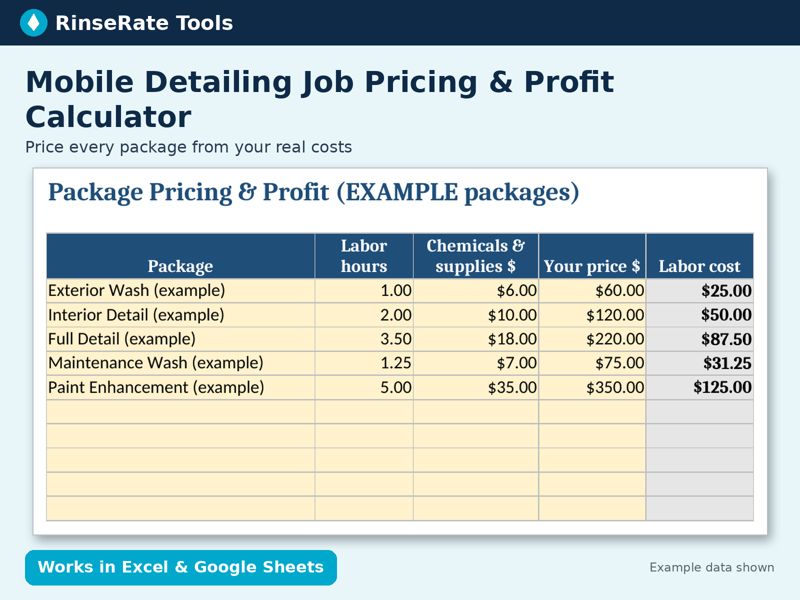
Template: Mobile Detailing Job Pricing & Profit Calculator
Enter your labor rate, chemical cost, travel cost per mile and overhead once. See true cost, profit, margin, profit per hour and a suggested price for each package, plus a one-job quote tab with vehicle-size multipliers and add-ons.
Excel + Google Sheets. Regular price $14; check the listing for current price. Example data is labeled; replace it with your own numbers.
Get the template on Payhip