What to put on every auto detailing invoice
- Your business details: business name, phone, email and service area.
- Invoice number and date: number them in order (1001, 1002, and so on) so you can match payments and find an old job fast.
- Customer and service address: where you did the work can differ from the billing address, for example a car detailed at the customer’s office.
- Service date.
- The vehicle: year, make, model and color. A VIN or plate is optional, but useful for fleet and dealer accounts and for households with more than one car.
- Package line: the package name and the vehicle size it was priced at (car, SUV or truck, large SUV or van).
- Each add-on on its own line: pet hair, odor treatment, engine bay, headlight restoration and so on.
- Travel fee as its own line, if you charge one.
- Discount as its own line, so your package prices stay intact.
- Subtotal, sales tax (only if it applies), total.
- Deposit received (with the date) and the balance due.
- Payment terms and due date, and how to pay.
- Notes: condition notes such as existing scratches, curb rash or stains you treated but couldn’t fully remove.
Sample layout
Copy this structure into whatever you use, from a word processor to a spreadsheet to your field software.
Your Detailing Co. · phone · email · service area
Invoice #1042 · Invoice date: Oct 20, 2026 · Service date: Oct 20, 2026 · Due: on completion
Bill to: Customer name, phone · Service address: where the car was parked
Vehicle: 2021 SUV (make, model), gray · Plate: optional · Size: SUV / truck
| Item | Description | Amount |
|---|---|---|
| Package | Full detail (interior + exterior), SUV / truck pricing | $290.00 |
| Add-on | Pet hair removal (confirmed on site before starting) | $40.00 |
| Add-on | Headlight restoration, both lenses | $60.00 |
| Travel fee | Outside the free service area | $15.00 |
| Subtotal | $405.00 | |
| Sales tax (only if your state taxes this service) | $0.00 | |
| Total | $405.00 | |
| Deposit received Oct 14 | −$50.00 | |
| Balance due on completion | $355.00 | |
Notes: Light scratches on the rear bumper were there before the detail. Coffee stain on the passenger seat was treated and lightened but not fully removed.
Why the vehicle belongs on the invoice
Pressure washers bill a property. Detailers bill a vehicle, and the vehicle changes the price. Writing the year, make, model, color and size on the invoice does three things:
- It explains the price. A third-row SUV costs more than a compact car because it takes longer, and the size on the line shows why.
- It keeps records straight for repeat customers with two or three cars, and for fleet or dealer accounts where the plate or the last digits of the VIN is how they match your bill to their vehicle.
- It backs up your condition notes. “Scratch on rear bumper” means more when the invoice also says which car, and you have dated before photos on file.
Put packages and add-ons on separate lines
Keep the package price the same as your price list and add extras as their own lines. Customers can see exactly what they chose, and you can see later which add-ons people actually buy. For extras you can’t judge from a photo, like pet hair or heavy sand, confirm the price on site before you start and note that on the line (“confirmed on site”). That one phrase heads off most invoice disputes.
If your package names or size tiers aren’t settled yet, start with our guide to building a mobile detailing price list, then use the exact same names on your invoice.
Travel fees
A travel fee works best as its own line, never folded into the package price. That way your package prices stay the same everywhere and customers see the drive as a separate, fair charge. Two common ways to set it:
- Flat fee by zone: free inside your core area, a set fee for the next ring out, and so on. Easy to quote on the phone.
- Per mile beyond a radius: more precise, but you need to measure each address.
Base the fee on what the drive really costs you in fuel, wear and unpaid time. Our mobile detailing pricing guide shows how to work out drive cost per job. Whether sales tax applies to a travel fee depends on your state, so check before you add tax to that line.
Deposits
Deposits make the most sense for long or expensive jobs (ceramic coatings, paint correction), for new customers far outside your area, and for weekend slots that fill first. Show the deposit twice: on the booking or quote as an amount due to hold the slot, and on the final invoice as a payment received with its date. Put your cancellation and refund rule for deposits in writing at booking, and repeat it in the invoice notes if it matters for that job.
Payment terms
- Retail customers: “due on completion” is normal for detailing. Hand over the keys and the invoice at the same time, and take payment before you pack up.
- Fleet, dealer and commercial accounts: they often need Net 15 or Net 30 and may ask for a W-9. Agree on terms in writing before the first job, and put the due date on every invoice.
- Tips: keep tips out of the invoice total. Record them separately so your sales and any sales tax figures stay clean.
- Late fees: if you charge one, state it at booking and on the invoice. Rules on late fees vary by state.
Track what’s still owed
Most retail detail jobs are paid on the spot, so the invoices that slip are usually fleet accounts, “I’ll send it tonight” customers and deposits that never turned into a final payment. Keep one row per invoice with the total, deposit, final payment, balance and due date, and sort unpaid ones into aging buckets: current, 1–30, 31–60, 61–90 and 90+ days past due. Once a week, follow up on anything past due, starting with the oldest: a friendly text first, then a call.
When software invoicing beats a spreadsheet
A spreadsheet invoice plus a payment tracker is enough for many solo detailers. Field service software starts to pay for itself when you want:
- a card payment link inside the invoice, or tap to pay in the driveway
- automated payment reminders, so you’re not chasing balances at night
- quotes that turn into invoices in one tap, and online booking that takes the deposit for you
- before-and-after photos attached to the job record
- more than one tech sending invoices
Some links are affiliate links; we may earn a commission at no cost to you. Details
Urable is built for automotive care. Its Express plan lists text and email invoicing, automated reminders and Stripe and Square integration, along with vehicle records and VIN scanning (checked Oct 2026). It’s the one tool on our list our team has used day to day on real detail jobs, and building an invoice from a phone in the driveway is one of the things it does well. Jobber lists quotes and invoices with online payments on its Core plan, with automated quote and invoice follow-ups on Connect (checked Oct 2026). Plan details and prices change, so check each vendor’s page.
For full plan comparisons, see our best software for mobile detailing guide, or when to switch from a spreadsheet for a simple cost framework.
Template for this
The invoice + payment tracker holds every field on this page. Pick the vehicle size, package and add-ons from dropdowns, add a travel fee or discount, and the totals, deposit and balance due fill in. Pick an invoice number on the Invoice tab to get a printable invoice, and the Summary tab shows paid vs unpaid and the aging buckets above. The pricing calculator helps you set the package prices it pulls from.
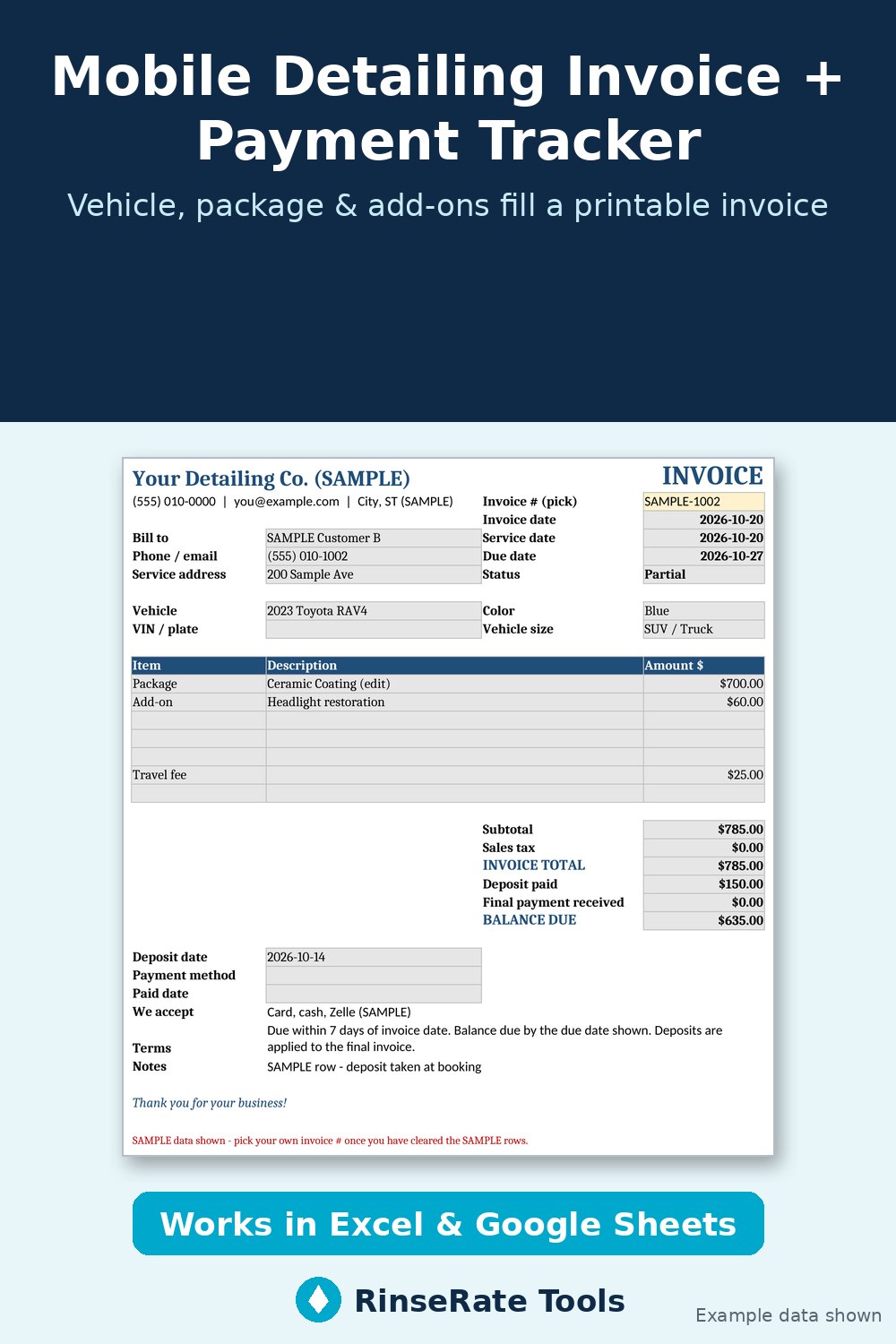
Template: Mobile Detailing Invoice + Payment Tracker
Log each job with the customer, vehicle (year, make, model, color, VIN or plate), package, add-ons, travel fee and discount. Package and add-on prices fill in by vehicle size, a printable invoice fills itself from the invoice # you pick, and the Summary shows paid vs unpaid and A/R aging.
Excel + Google Sheets. Regular price $12; check the listing for current price. Example data is labeled; replace it with your own numbers.
Get the template on Payhip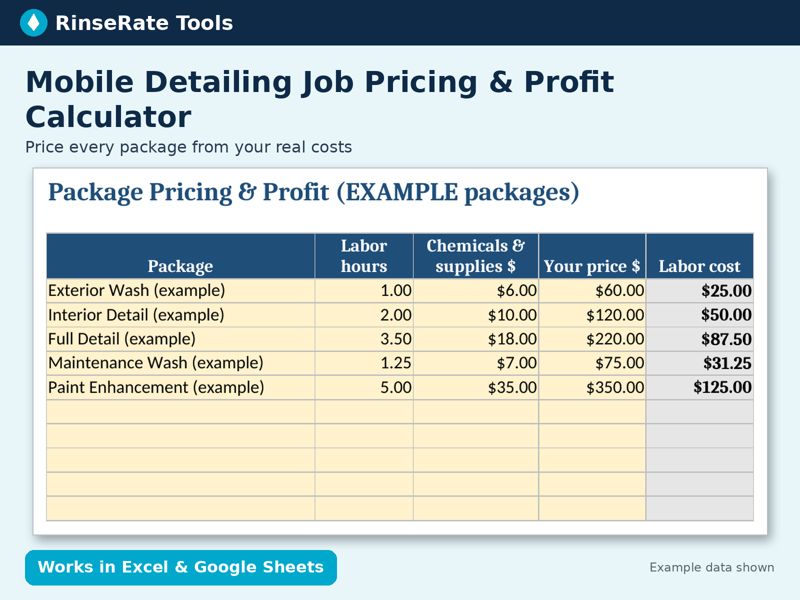
Template: Mobile Detailing Job Pricing & Profit Calculator
Enter your labor rate, chemical cost, travel cost per mile and overhead once. See true cost, profit, margin, profit per hour and a suggested price for each package, plus a one-job quote tab with vehicle-size multipliers and add-ons.
Excel + Google Sheets. Regular price $14; check the listing for current price. Example data is labeled; replace it with your own numbers.
Get the template on Payhip Or on Gumroad